:focal(952x124:953x125))
Most of the FabCon 2026 Fabric announcements from Barcelona are still in preview. That is worth knowing before you rewrite your roadmap, because it changes the question from “what do we adopt?” to “what do we prepare for?”
Microsoft announced a lot at FabCon Europe (28 September to 1 October). We picked the five that most affect cost, risk and day-to-day delivery. For each one: what it changes, where it stands today, and what to check first.
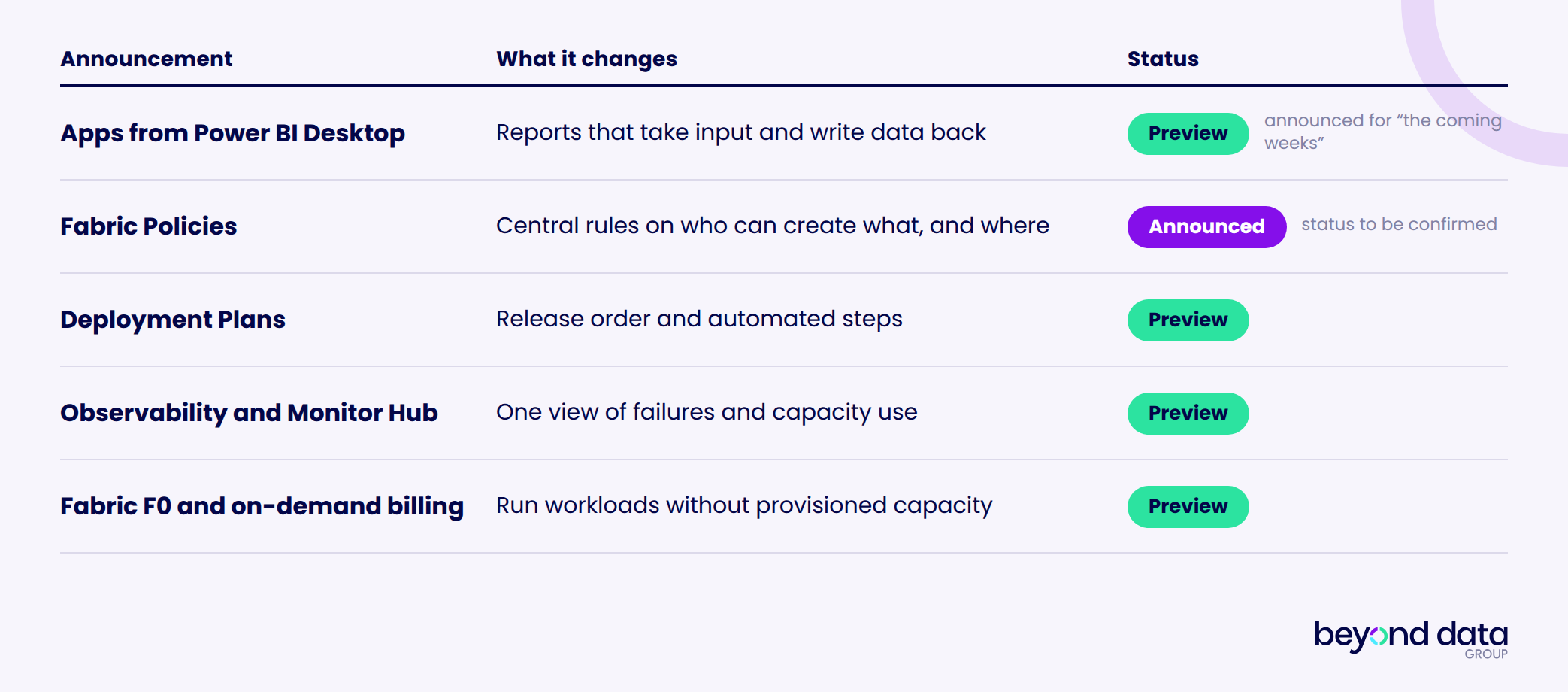
FabCon 2026 Fabric announcements at a glance
1. Power BI starts building applications, not only reports
For years, analytics applications and operational applications have lived apart. You built the dashboard in Power BI, and the data entry in a custom web app with its own database.
Microsoft is now trying to bring those worlds closer together. In Power BI Desktop, you start from a semantic model (the governed data model behind your reports) and describe the app you need. For example: “Create an application where sales managers can review actual sales, enter monthly targets, add comments and approve the forecast.” You preview it, edit it and publish it to Fabric. Apps can take input, write data back and keep shared state.
That puts budgeting, KPI management, stock management, planning and master data within reach of a BI team. Instead of Power BI plus a custom web app plus a separate database, you may increasingly see a semantic model, a Fabric App and a Fabric database.
Where it stands: Microsoft said the Power BI Desktop experience would enter preview “in the coming weeks” for Power BI Pro, Premium Per User and Fabric capacity customers. The Fabric Apps layer underneath has been in preview since June 2026.
Three things to check before you plan a pilot:
Capacity and region. Apps run on Fabric capacity. Fabric Apps are not available in all regions yet, and a tenant admin must enable them first. Check where your capacity runs.
Fit. Coverage of the announcement reports that complex multi-step transactions, stored procedures and custom authentication may not suit Fabric Apps. Verify this against Microsoft’s own documentation.
Ownership. If many analysts can publish apps, someone must own support, security and lifecycle. Clear roles and training for the people who build matter as much as the technology.
This could change how smaller departmental applications get delivered. Power BI is not just becoming a better BI tool. It is becoming an entry point into application development.
2. Fabric Policies: guardrails instead of good intentions
As more people build in Fabric, the same questions keep coming up. Who can create a Lakehouse? Where can Dataflows be created? Who can share data externally? What is fine in DEV but not in PROD?
Until now, the answers lived in tenant settings, workspace permissions and team habits. Fabric Policies add a more granular layer. Early coverage describes it as the first time Fabric lets administrators limit what users can create, and policies can use Microsoft Purview labels to govern data by its content.
This matters more if point 1 happens. When more people can build apps, the guardrails need to exist first. Start by writing down the five rules you would want in production, then compare them with what your tenant settings can enforce today.
3. Deployment Plans: releases in the right order
Moving items from DEV to TEST to PROD is the easy part. The hard part is the order: lakehouse before notebook, tables before warehouse, warehouse before semantic model, semantic model before report.
A deployment plan is a workspace item that adds explicit item order and automated actions to a deployment operation, and it works with deployment pipelines. So it adds to your pipelines rather than replacing them. In practice you can deploy the lakehouse, run an initialisation notebook, deploy the warehouse and semantic model, then run a validation step at the end.
Where it stands: preview. The documentation lists limits that matter in real projects:
A failed deployment is not rolled back.
Independent deployment groups can’t be deployed in parallel.
The fabric-cicd library doesn’t support deployment plans.
If your automation already runs on fabric-cicd, that last point decides your timing. Teams that ship the same Fabric solution to several environments or customers will feel the benefit first.
4. Observability: from “what failed?” to “what is using my capacity?”
Running Fabric in production means answering four questions quickly. What failed? What is consuming capacity? Which workspace is responsible? Which operation caused the spike?
Microsoft’s answer is a joined-up operations experience. Observability in Fabric brings together workspace monitoring, the Monitor Hub and operations agents, and it is in preview. Workspace telemetry can be collected in an Eventhouse, so you can analyse it with KQL (Kusto Query Language) and trigger alerts with Activator.
The scenario to aim for: capacity use rises, you identify the workspace and the operation, an alert fires, and you investigate the root cause in one place instead of five.
This is a cost topic as much as a technical one. Capacity is shared, so one heavy job can slow everyone down.
5. Fabric F0 and on-demand billing: a lower entry point
Smaller organisations often ask whether they really need permanently provisioned Fabric capacity.
F0 is Microsoft’s answer: zero provisioned compute units. Supported workloads draw compute when they run, and you pay for what you use. F0 pay-as-you-go capacity is in preview.
It suits development environments, proofs of concept, irregular ETL and early adoption. There is also a hybrid pattern. Keep a small, predictable capacity (an F2 or F4, for example) for Power BI, and move bursty ingestion to on-demand compute so it doesn’t compete with interactive reports.
It does not make Fabric free. Storage and consumed compute still cost money. Related, and also in preview, is capacity overage. It bills excess usage at three times the pay-as-you-go rate instead of throttling, within limits that admins set per capacity.
Usage-based billing only works if someone watches usage. Deciding what runs on provisioned capacity and what runs on demand is an architecture decision, not just a pricing one.
FAQ
Most are not. Apps in Power BI Desktop, Deployment Plans, observability and F0 were in preview at the time of writing. Check Microsoft Learn for current status before committing.
:focal())
Which of these matters for your Fabric setup?
Not every announcement is relevant to every organisation. If you’d like a second opinion on which ones to pilot or prepare for, talk to us!